Logo
Item Numbers


The item number utility creates item number symbols consisting of leader lines symbols and related text onto the current drawing sheet. It supports a large range of symbols types, both rectilinear and curved, and allows several differing text styles.

bb070 

This utility can reduce the time taken to draw a item number from a minute to a matter of seconds.


Movie Demonstration of Item Number Utility


Zipfile
ZIP file
1.37Mb

AVIFile03
AVI file
10.5Mb


bb070 

It removes the tedium of having to draw all the individual leader lines, lines, circles and text.

bb070 

This utility allows the drawing of a large number of differing item symbols with automatically incrementing text, in one instance and in seconds without having to repeat the same drawing operations.

Download
Item Number Utility, Evaluation Version 0.1
60Kb

Functionality:

The evaluation version of this utility ....

  • Allows the insertion of item bubbles onto the XY plane of the WCS.
  • Supports numerical contents of item bubble only.
  • Supports single circular bubble outline only.
  • Supports multiple insertions of item bubbles to a maximum of six item numbers for each command execution.
  • Automatically increments item bubble contents
  • Item bubble consists of leader line, symbol and text.
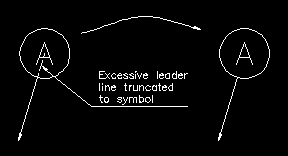
  • Leader line is clipped to bubble outline.
  • Item bubble and leader lines are drawn on layer "0".

The full version of this utility ....

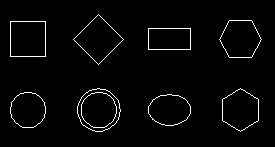
  • Greater range of supported bubble outlines including square, diamond, double circle, ellipse and hexagonal.
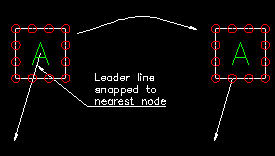
  • Leader is snapped to equally spaced points on outline for rectilinear outlines, see diagram below.
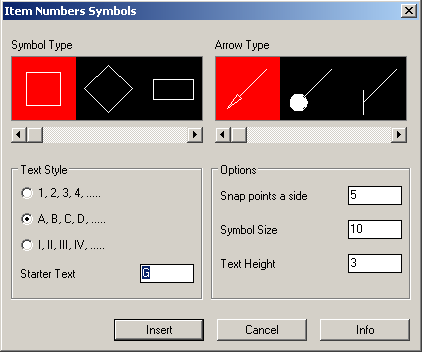
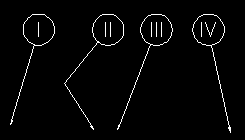
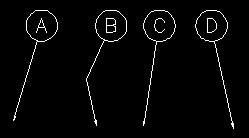
  • Numeric, alphabetical and numeral item text styles supported, see diagrams to sides.
  • Unlimited number of insertions of item bubbles.
  • Automatically increments numeric, alphabetical and numeral text styles.
  • Standard representation of roman numerals supported.  That is 9 is “IX”, 49 is “IL” etc.
  • Item bubble, contents and leader lines are created on the XY plane of the current UCS.
  • Allows the user to specify the layer upon which the item bubble is drawn.
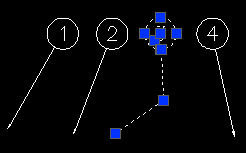
  • Smart editing feature associates the outline, text and leader line together.
    • Moving the arrow end of the leader line results in the intersection point being recalculated, download screen shot.
    • Moving the symbol or text results in the leader line intersection point being recalculated and the text or symbol moved, download screen shot.

See below and to the side for the figures of the supported symbol types. 

ItemNumber02

Item number consists of leader line symbol and associated text.(Numeric style shown)

ItemNumber203
ItemNumber303

Leader line can be either defined by two nodes or multiple nodes.
(Numeral and alphabetical style shown)

ItemNumber6

Eight symbol types are supported within the unrestricted version.

Only the circle symbol is supported within the restricted version

ItemNumber4

For curved symbols, the leader line is trimmed to the particular symbol selected.

ItemNumber502

For rectilinear symbols, the leader line is snapped and trimmed to the nearest snapping point on the symbol outline.